BUILD
Put the job into clear numbers.
Add labor, materials, tax, discounts and deposits. Use trade presets and keep customer details with the job.
 Job Quote Kit / ESTIMATES & INVOICES
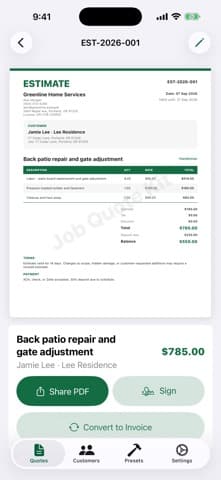
Turn labor, materials and job details into a clear estimate on your iPhone. Preview the PDF, check the totals and send it to your customer.
First document export free · iPhone & iPad · iOS 18+
FOR THE PERSON DOING THE JOB
For handymen, cleaners, landscapers, painters, plumbers, electricians and solo service businesses.
BUILD
Add labor, materials, tax, discounts and deposits. Use trade presets and keep customer details with the job.
SEND
Preview your estimate and share it through Messages, Mail, WhatsApp or Files. Your first document export is free.
REPEAT WORK / PRO
Pro adds your logo, approval signatures, job photos, custom terms and estimate-to-invoice conversion, with unlimited exports.
A SMALL EXAMPLE
Change the sample labor and materials below. In the app, add your customer, job details and document terms, then review the full PDF.
WEBSITE EXAMPLE / USD
Labor$130.00
Materials$45.00
Subtotal$175.00
Example tax$0.00
Sample total$175.00
An illustrative calculator, separate from the app. No data is sent or saved. It does not generate a PDF or recommend a tax rate.
GET STARTED
Try a draft, preview the document and export your first PDF before deciding whether you need Pro.
Create your first quote on the App Store (opens in a new tab)Start with a repeat customer or a new job. No account setup required.
Check prices, quantities, tax rates and terms before sending.
Use your iOS share sheet to choose where the document goes.
SEND IT YOUR WAY
Choose Messages, Mail, WhatsApp or Files from the iOS share sheet. Your customer can review the PDF without installing Job Quote Kit.
Sharing uses apps available on your device. Check the document before sending; this app does not collect payment.
TRY FIRST. DECIDE AFTER.
The free plan includes drafts, PDF previews and one document export. Choose a monthly or yearly subscription, or a one-time lifetime purchase, when you need more.
JOB QUOTE KIT PRO
Monthly and yearly subscriptions auto-renew. Lifetime is a one-time purchase. Current regional prices and terms are shown in the App Store and inside the app.
BEFORE YOU DOWNLOAD
Create drafts, preview PDFs and export your first document. Pro unlocks unlimited exports, watermark removal and the additional business features listed here.
No. Job Quote Kit has no required account and uses local-first document storage.
Share your PDF through Messages, Mail, WhatsApp or Files using the iOS share sheet. Review your customer details, totals and terms before sending.
You can choose a monthly or yearly auto-renewing subscription, or a one-time lifetime purchase. Check the current price and terms in your local App Store and inside the app. Manage subscriptions through your Apple ID settings.
Requires iOS 18 or later on iPhone or iPadOS 18 or later on iPad. Device-specific features may have additional requirements.
It creates business documents; it does not collect payments or provide legal, tax or accounting advice. Check tax rates, terms and customer requirements for your situation.
START WITH THE JOB IN FRONT OF YOU
Features checked against the live store listing on 5 October 2026. Need help?
Optional measurement helps us understand visits and clicks. Choose separately below. You can change your choices in the footer.